Law firms, with privilege protected
For lawyers, confidentiality is not negotiable. That is why the platform runs on the firm's own server or in a dedicated private cloud: case files, contracts and client correspondence are never sent to any outside service.
What we solve.
- 01
The law as it stood on the date of the facts
Every article can be read in the version in force on a given date, with its complete amendment history.
- 02
Contract review
Incoming contracts are compared clause by clause with the firm's templates, and deviations are flagged explicitly.
- 03
The firm's knowledge, within reach
Past opinions, briefs and case files become searchable, with a link to the source document.
Services for law firms.
- 01
An assistant for case files and archives
Plain-language questions across the firm's files and documents, with every statement linked to its source page.
- Page-level citations
- Access rights per case file
- Nothing passed to third parties
- 02
Contract review
Contracts compared with the firm's templates, essential clauses checked, terms and percentages recomputed.
- Penalties and payment terms
- Jurisdiction and force majeure
- Exportable report
- 03
Legislation and drafting
National legislation by version, linked to the firm's documents, and drafting on the firm's own templates.
- The version in force on any date
- The firm's own templates
- Word export
Features.
The features relevant to this sector, on real screens from the application.
- 01
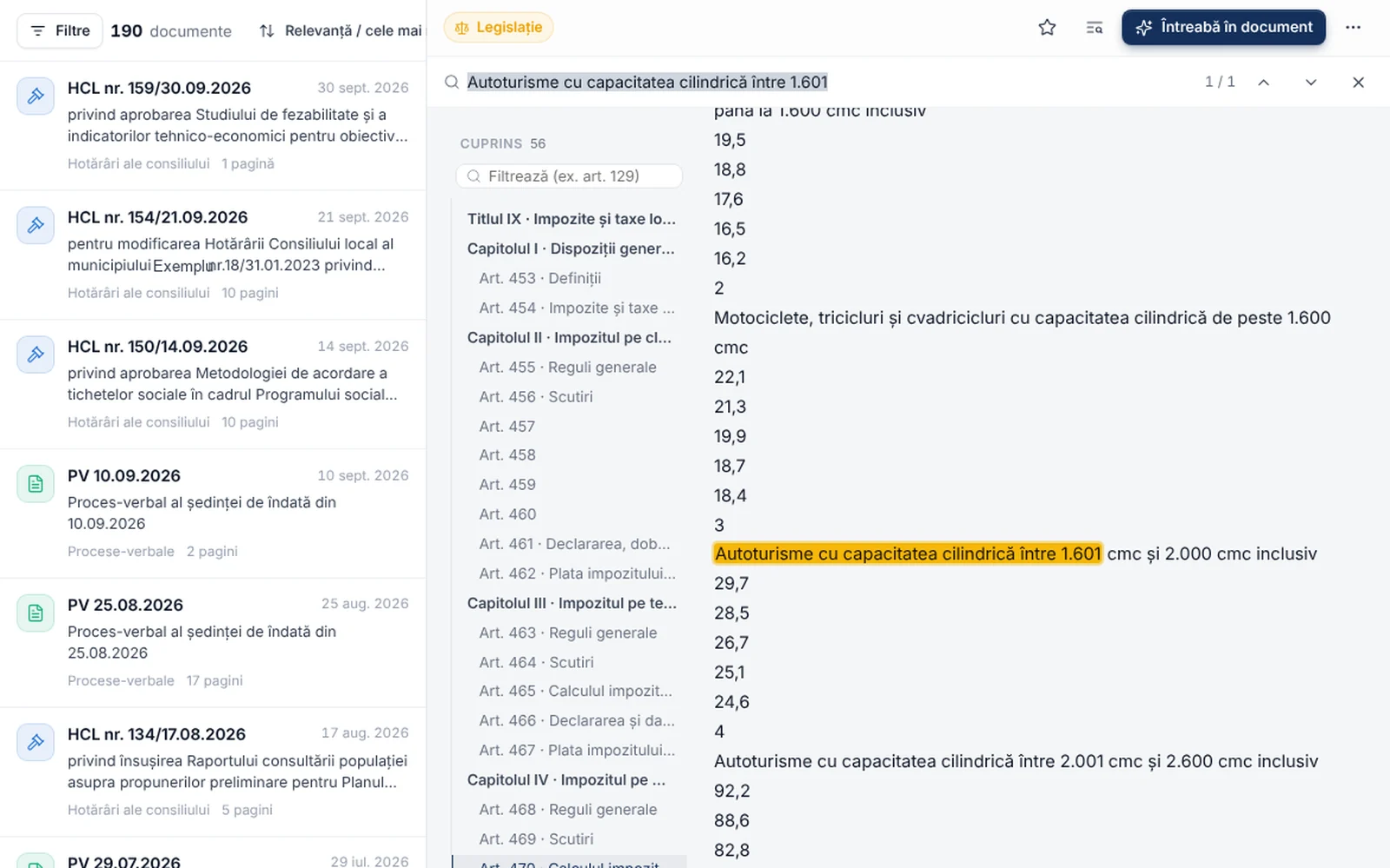
Questions with sources
The institution's archive becomes searchable in plain language.
Staff ask a question as they would ask a colleague, and the system searches decisions, regulations, contracts and minutes. Every statement in the answer links to the document and page it comes from.
- Citations down to page and paragraph
- Figures recomputed from documents and marked as verified
- Works on scanned documents
- Access rights respected in search results
- 02
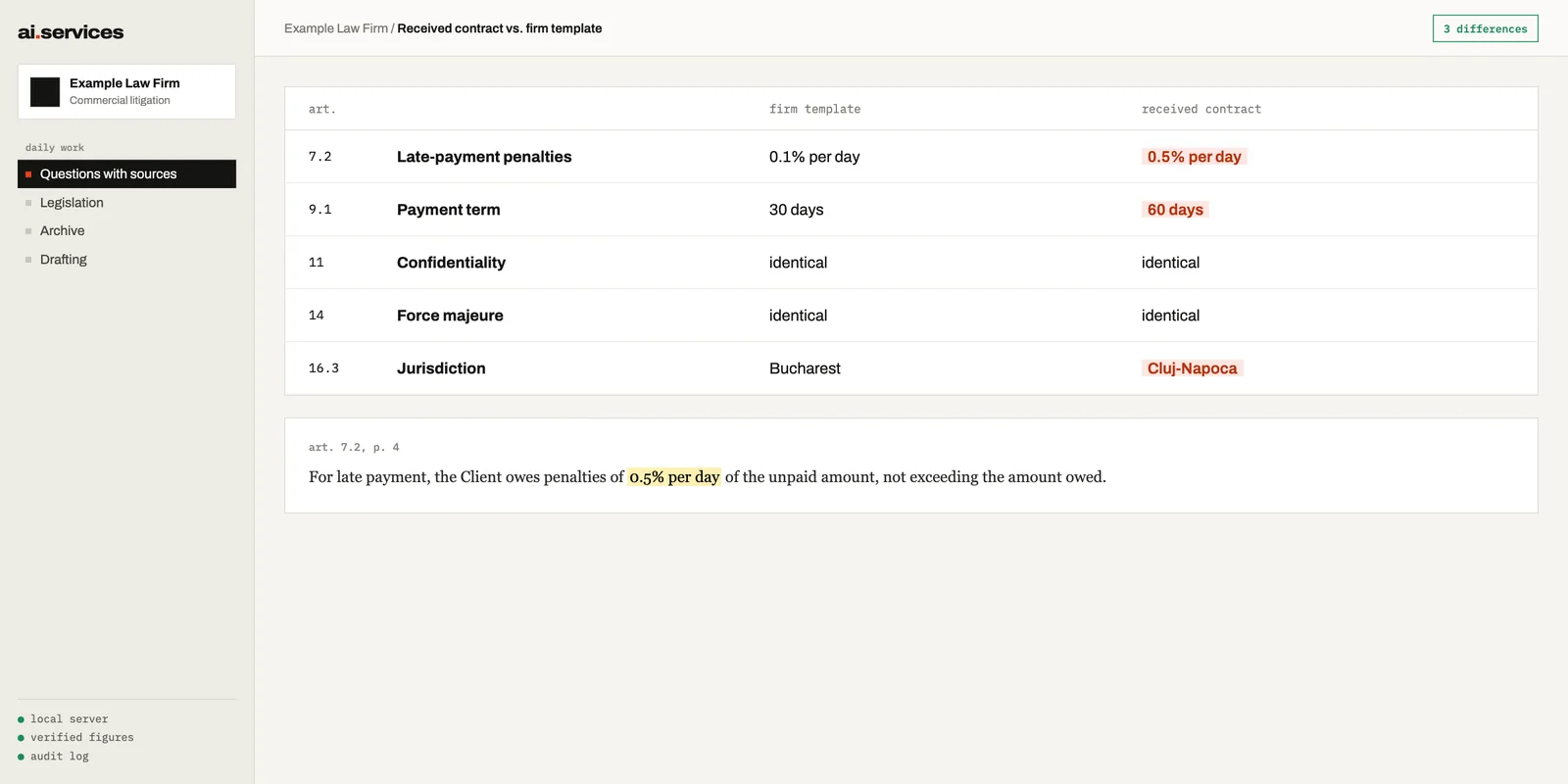
Contract review
The differences between an incoming contract and your own template, clause by clause.
For law firms and in-house legal teams: the system aligns articles, highlights deviations and recomputes terms and percentages, without the documents ever leaving the client's infrastructure.
- Comparison against the firm's templates
- Penalties, terms and jurisdiction flagged explicitly
- Links to the exact contract wording
- Full confidentiality of case files
- 03
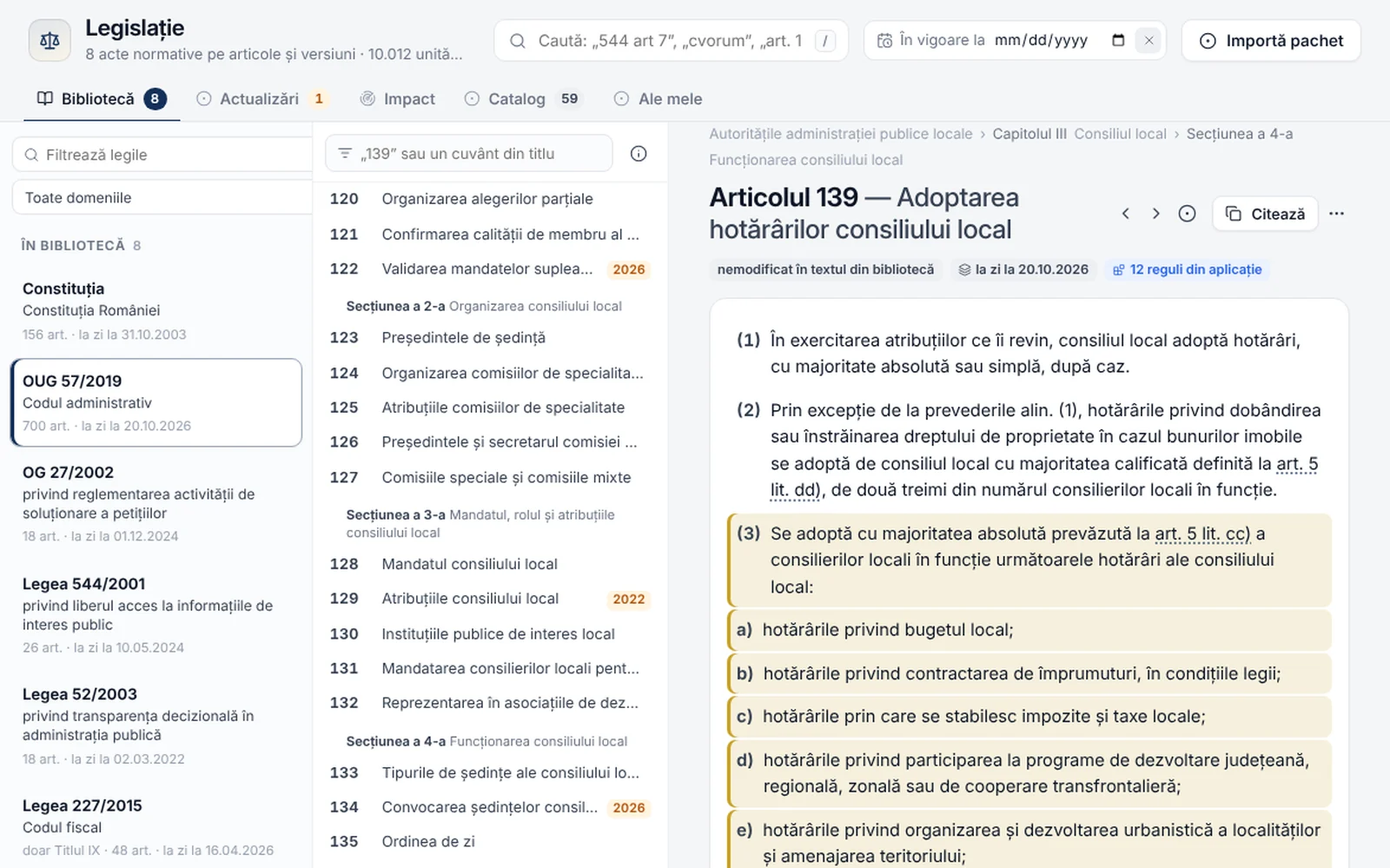
Legislation
National legislation, structured by article and version.
Any article can be read as it stood on a given date, and answers and checks cite the version that applied when the document was issued. Updates arrive daily as signed packages and apply only once approved.
- The version in force on any date
- Complete amendment history
- Digitally signed update packages
- Controlled roll-out, approved by the institution
- 04
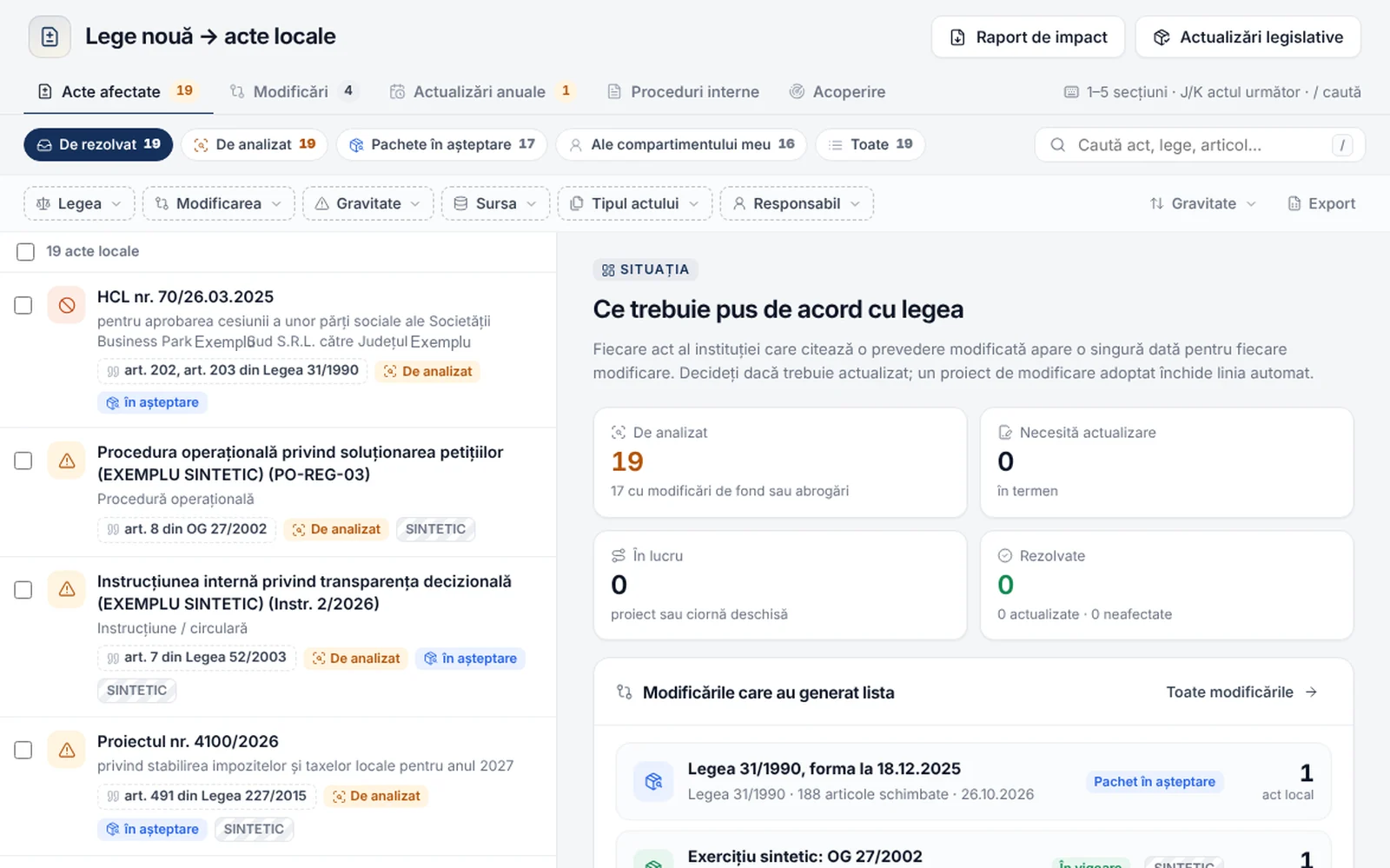
Impact of legal changes
When a law changes, the institution's affected acts are identified automatically.
The system finds the decisions, regulations, internal procedures and document templates that cite the amended provision and proposes the action each one needs.
- Affected acts grouped by severity
- Amendment drafts started straight in the decision path
- Yearly updates, such as local tax indexation
- A record of the decision taken for each act
- 05
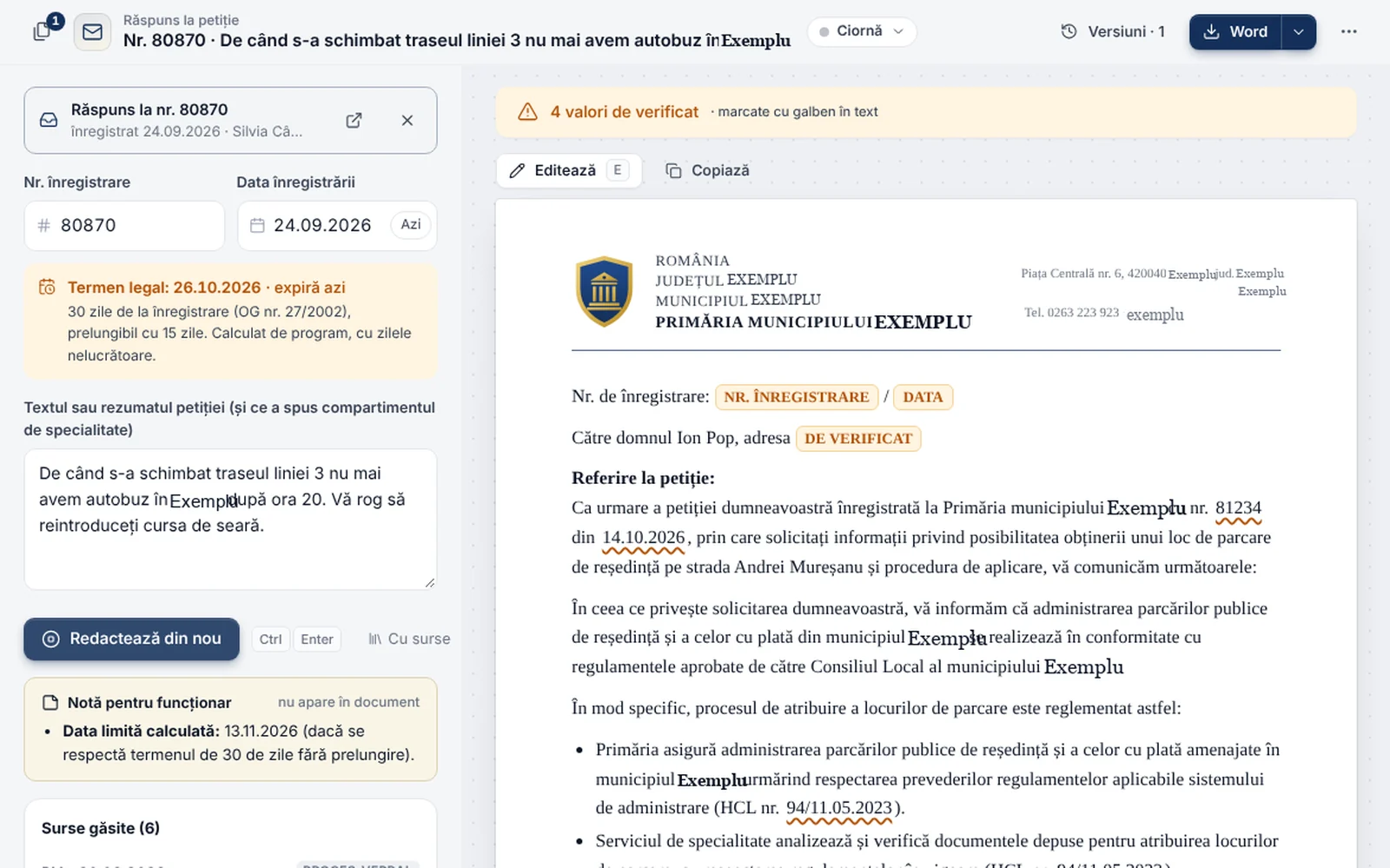
Drafting
Official documents, generated on the institution's own templates and letterhead.
Replies to petitions, orders, reports and minutes are drafted from the data already in the system. Staff review and sign instead of writing from scratch.
- Own templates, kept and versioned
- Deadlines and legal references filled in automatically
- Comparison between versions
- Direct export to Word
- 06
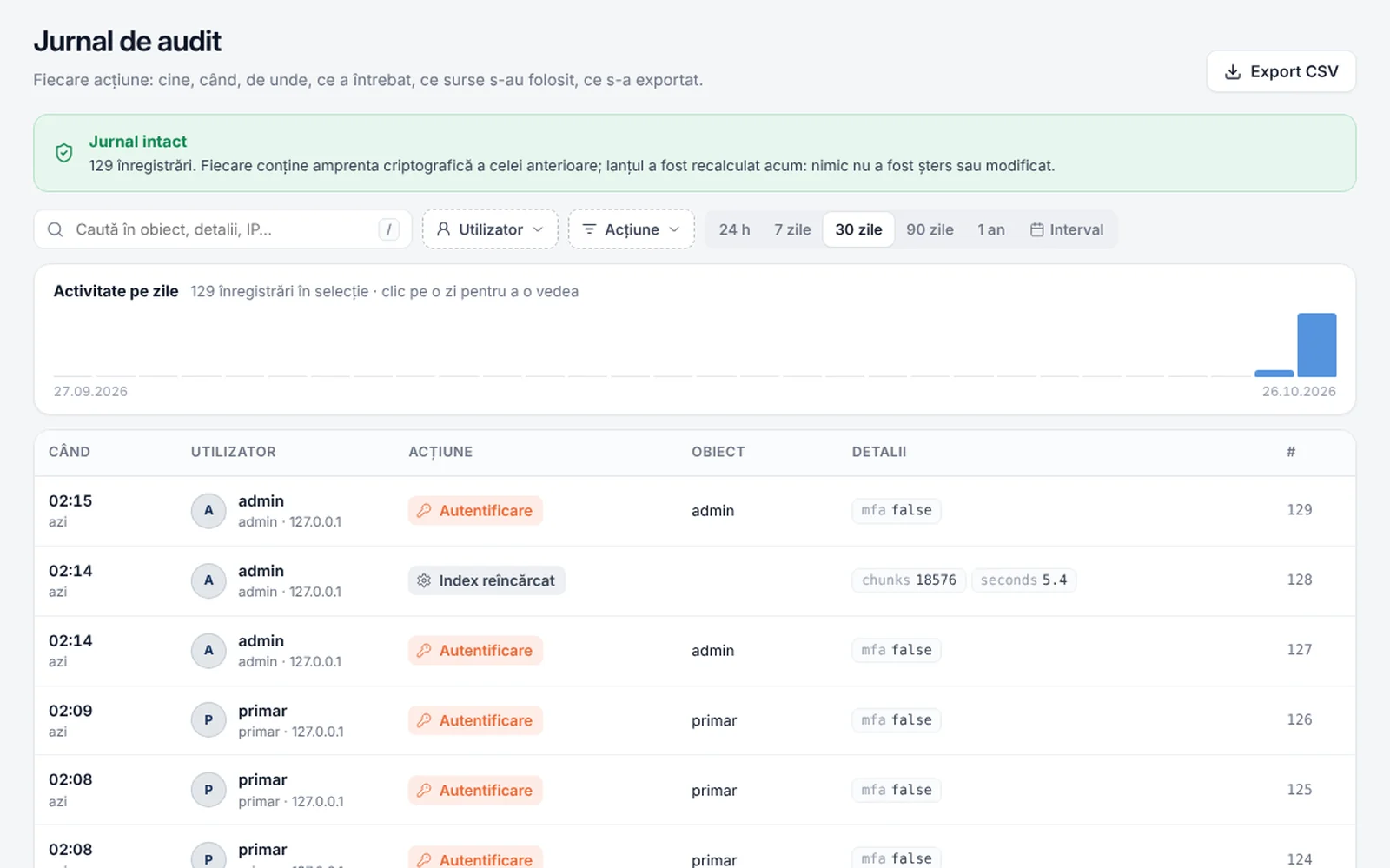
Audit log
Every action is recorded, and the log cannot be altered.
Sign-ins, questions, generated documents and changes are written to a cryptographically chained log. Any later tampering breaks the chain and shows up on verification.
- Who, what, when and from where
- Integrity verifiable at any time
- Export for auditors
- Security events flagged
- +37
And much more
Every organisation has different needs. Beyond the examples above, the platform includes more than 37 modules, and new functionality is built on the same core, starting from your own processes.
Available modules.
- 01Questions with sources
- 02Document archive
- 03Legislation
- 04Impact of legal changes
- 05Document drafting
- 06Contract review
- 07Audit log
- 08Custom modules for the firm's workflows
Custom implementations
Every firm works differently. We build tools adapted to the practice and its own workflows.
- An intake assistant for new clients
- A chatbot on the firm's website
- Automatic extraction of deadlines from documents
- Summaries of voluminous case files
- Integration with the practice management software
- Any other workflow
Security and data protection.
Security is part of the platform's architecture, not an afterthought. Every typical requirement in a tender specification has a verifiable answer, documented in a security dossier delivered with the system.
- 01
Encryption
Data is encrypted both in transit and at rest.
- HTTPS with certificates issued by the organisation's own certificate authority
- Server disk encryption (BitLocker or LUKS)
- Passwords stored only as salted scrypt hashes
- 02
Backups
Daily, automatic, encrypted backups with tested restores.
- Every archive encrypted with AES-256
- SHA-256 checksum and integrity verification
- The last 30 copies kept, monthly test restore
- The encryption key stays with the client
- 03
Access
Every user sees only what they are entitled to see.
- Two-factor authentication (TOTP)
- Permissions by function and document type, enforced on the server
- Automatic lockout after repeated attempts
- Expiring sessions and CSRF protection
- 04
Audit
Every action leaves a trace that cannot be erased.
- Cryptographically chained log (HMAC-SHA256)
- Archiving without deletion, with chain verification
- Security events flagged to the administrator
- Separate development, test and production environments
- TLS
- AES-256-GCM
- SHA-256
- HMAC-SHA256
- TOTP
- scrypt
For every requirement, the security dossier describes what the system does, where it lives in the code and how an assessor can verify it.
Contact us.
We present the platform on demonstration documents or on a set of the organisation's public documents, and answer any technical or legal question about implementation.
- Phone
- +40 750 450 909